
Development
MULTOS application development requires the MULTOS SmartDeck SDK. Code is typically written, compiled and debugged the using Eclipse CDT IDE. This is covered in detail at Trust Anchor Technical Support.
Developing applications for Trust Hub is virtually identical to developing applications for smart cards in that the application is processing APDU commands.
A suggested development path is:-
- Use SmartDeck’s simulator hsim for initial development and debugging of applications *
- Use a Trust Anchor developer kit to run, and if required debug, the app in-chip (the same chip that is used in Trust Hub)
- Deploy the app to a Trust Hub dongle for integration testing (requires certificates from the MULTOS Key Management Authority) **
Notes:
- hsim does not support the Trust Anchor specific API and may not support all the primitives supported by Trust Anchor / Hub devices. Trying to call an unsupported feature will result in an “abend”.
- It is also possible to debug in-chip using a Trust Hub dongle, but the need for KMA certificates makes this less dynamic that using a Trust Anchor dev. kit
Loading Applications to Trust Hub
Before it is possible to load an application, you must be registered with the MULTOS Key Management Authority (KMA) and have enabled your Trust Hub device. See here for details.
The following instructions use SmartDeck SDK commands and are for using an unprotected ALU. myapp.hzx is the built application.
The StepXpress user manual can be found in the Technical Library.
Obtain the Load Certificate
Follow Section 4 in the StepXpress User Manual providing the myapp.json file (Application Definition file upload). The output of the process is a .ALR file.
Notes:
- The certificate will allow the application defined in the definition file to be loaded to any Trust Hub device enabled to the issuer.
- Normally, the certificate will only work for one version of the application.
- To request a certificate that will work on multiple versions of the application
- Remove the Application Code Hash information from the request
- Set Code Size, Data Size, Session Size, DIR Size and FCI Size to the largest sizes the app is likely to reach and is allowed, e.g.
- 25000, 10000, 2000, 32, 32
Obtain the Delete Certificate(s)
A delete certificate is required per Trust Hub device. The file of serial numbers (.mid) created during enablement should be provided in the Certificate Parameters / Advanced Options section of the request. The output of the process is a .ADR file per device.
Notes:
- An ADC will delete any version of the app.
- Make sure to use the delete certificate that matches the device; only so many failures are allowed before deletion is blocked.
Loading the Application
To load the application, use the command
- hterm -serial COM10:i2c -alu myapp.alu -alc myapp.ALR
And to delete it, use the ADR specific to the device as follows:
- hterm -serial COM10:i2c -adc myapp-001.ADR
Note: the COM port number must be set to that specific to the Trust Hub device on the PC being used.
Walk Through
The following slides show this process for the sample application.


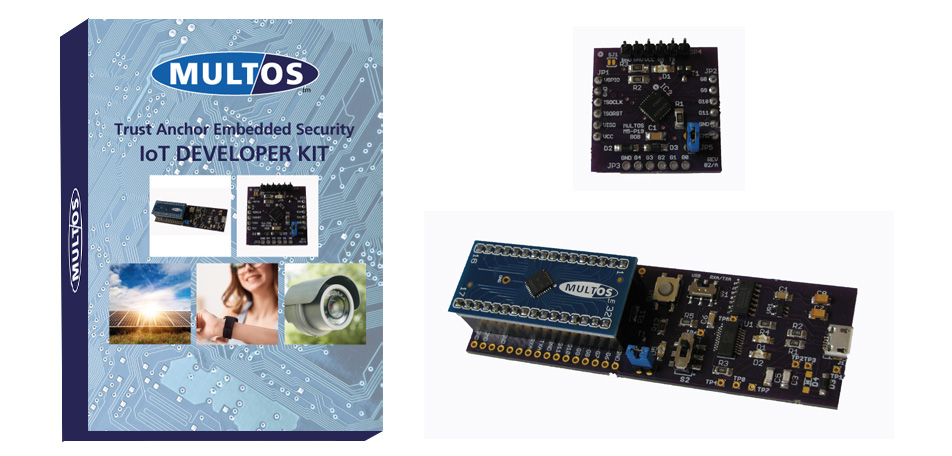
Trust Anchor IoT Dev Kit
The IoT Dev Kit contains the same MULTOS chip as Trust Hub but with test keys meaning that applications can be loaded, tested and deleted without the need to obtain KMA certificates.